Building Deep Research: What Worked and What I Never Solved
This is the engineering side of Company Detective, and the second of two posts. As a reminder, this was a project for job seekers: could I use web crawling and LLMs to approximate the inside scoop a friend at the company might give you? The previous post covered the product and the research; this one is for implementers. If you’re building your first industry LLM pipeline, these are the lessons I most want to share. If you’ve already built several, I’d point you to the citation handling and the four cheap quality checks.
Nearly every design choice that survived the iteration cycles was a way to keep experiments fast by asking as little intelligence of the models as possible. The report users actually read mostly came from small models doing copy-paste tasks, and despite all the hype and fear, the LLM was the cheapest line on the bill.
I built this project in late 2024 and ran it into 2025, but didn’t get to writing it up until now. LLMs and LLM libraries are better in 2026, but many of the lessons about how to apply them are still relevant. One thing I won’t do is recommend 2026 tools: I’ll name what I used, but this tooling churns fast, so if you’re building now, do a fresh tool search rather than treating my stack as a recommendation.
Table of Contents (click to expand)
What worked
I’ll survey the code starting from the user’s first interaction down through how it works.
Specifying the target
The first thing a user does is enter the company they want to research. If the company report wasn’t already built, the user was prompted to request a new company using an Airtable form. I’ll come back to Airtable a bit later.
Initially I started from the dream user experience: What if the user could just type the company name and nothing else? It’s good to start with that sort of ambitious goal but I held onto it for too long, and it was harming iteration speed: the pipeline had to guess everything else about the company, and I spent my time debugging the guesses.
So I landed on a form with just a few required fields: the company name, the primary domain, the primary product if it was a different name. Then I included optional keywords to use in disambiguation, for instance the healthcare Clarify vs the AI Clarify.
Each field costs the user a few seconds and saves real engineering effort downstream. Behind the form, the same Airtable record also carried fields just for me: a refresh interval and per-company feature flags, like only keeping news articles or Reddit threads that link back to the company’s domain, so I could tune sources as needed. The net result was something reasonably quick for users to enter, that didn’t need as much engineering work, and that I could still customize per company.
I’m not suggesting I should’ve built that on day 1; I had to fail on the simpler experience to learn enough to make this tradeoff.
Getting the evidence
Search: Tune before reaching for agents
Once you have that, you want to gather all the evidence about the company. We know to check Glassdoor, but we don’t know the company’s ID on Glassdoor. We know the company’s name and domain, but not their ID on Crunchbase, or whether they have an app on the app stores, or a game on Steam. So I used a standard Google Custom Search Engine. Most sources got their own tuned search - the company’s webpage, news, Crunchbase, Glassdoor, Reddit - plus a general search on the company name and the company plus product. Not every source needs its own search, though: the app store and Steam pages were regex-extracted from the general search results, which saved a little search latency and cost.
It was worth putting real effort into tuning the searches. For company news, it was helpful to identify domains to exclude and tuning the date filters helped a lot. Even something as simple as quoting the company names was worth experimenting with: quoting the company name usually hurt more than it helped, so the Glassdoor query evolved to leave the company unquoted and quote the domain instead. But Googling on Reddit behaves differently, and so that query worked better with the name quoted. A more general discovery was that the related: operator had been officially retired in 2023, but it still worked through 2024. That was a big help in disambiguating companies with generic names like Clarify.
Another cheap trick: for a company with a hundred thousand pages on their domain, just search site: plus their domain to let Google’s index point you towards the most important pages. Compared to a depth-limited crawl, that tended to do a better job of surfacing key company news and diminishing pages like the terms of service.
I also ran some brief experiments in agentic search, but the unreliability made debugging and iterating much worse. So I doubled-down on search tuning which was predictable.
The big change since 2024 is that plain search APIs are being deprecated. Azure switched from a Bing search to a more agent-forward search, and Google’s CSE is doing the same. The general lesson on tuning is still relevant though the specific API providers are changing.
Search: Caching buys you iteration speed
Caching your searches will drastically speed up long days of iteration. The web is constantly changing, but the part of the web around a particular company doesn’t change all that often, so even long cache lifetimes are safe here. I still use the diskcache library for a simple, decorator-based way of doing it.
I’ll confess that I thought I did and actually didn’t: Perhaps I thought that requests-cache was handling it, but the google search library doesn’t use requests!
Crawling: Polite and still fast
Given all the search results, the next step is fetching the actual content. It’s a mixture of unstructured web pages and structured data like app reviews. In practice though, I had three categories:
- Web pages that are easy to crawl, like company pages
- Web pages that are hard to crawl, like Glassdoor
- Structured APIs, like app store reviews
This section is about the two web page types.
When crawling a website, I try to be polite about it. After all, the site admin is a person too and they don’t need any more frustration in their lives. But I also need quick iteration.
I balanced them with three things: broad concurrency, a per-domain concurrency limit, and request caching (next section). For the crawling I used aiohttp, which had a really nice way to do async concurrent requests: a TCP-level setting - TCPConnector(limit=10, limit_per_host=1) - that allows about ten requests in flight globally but only one per host. So I’d only be hitting one page on cnn.com at a time, but simultaneously one on geekwire.com, one on medhealthnews.com, and so on. The main downside is that it’s limited by the slowest domain, often limited by the timeout rather than concurrency. To counteract that, it’s helpful to reduce the timeout drastically - I set it to 2 seconds.
Then there were the sites where basic requests plus politeness were never going to work. These are the sites that often have Cloudflare captchas or require login, like Glassdoor, Crunchbase, Linkedin, and others. I used Scrapfly for those rather than building a Playwright stack myself. Having since used Playwright at Layr, this approach was definitely worth the dollar cost (~$30/mo) to speed up implementation on this project.
Crawl caching: The middleware gotcha
I also cached the webpage requests, initially with the requests-cache library, which configures itself from cache-control headers. The problem was that a lot of news sites set an extremely low cache-control value, tuned for breaking news even though most articles never change. So I overrode it with a fixed TTL of 7 days. That way, iterating throughout the week, I’m hitting each page at most once. I also cached 403s: If a host rejected a request, it’s rude to keep asking. (In theory, which codes are retryable should be standard across websites; in practice, sites use HTTP codes differently, so I ended up with a broad default rule.)
One warning about middleware like requests-cache: it patches requests globally, so it silently covers exactly the libraries that happen to sit on requests. That bit me in both directions. My Airtable client rode requests and got cached by accident, which I only noticed while debugging why my configuration changes weren’t taking effect. And my Google search client used a different HTTP library, so it was never cached at all. So I’ve come to prefer caching that’s explicit at the call site rather than easy-to-miss middleware, even when trying to iterate quickly.
Structured sources, denser prompts
Several sources didn’t go through the crawler at all. Google Play reviews came through the google-play-scraper library, Apple App Store reviews through app-store-web-scraper, Steam through its public reviews endpoint and requests, and Reddit through the API via asyncpraw. These come back as nicely structured data rather than HTML, which makes it much easier to build an information-dense prompt. The libraries also do a good job of abstracting the details of rate limiting, parsing, etc. so there’s less maintenance work. But the downside is that the maintenance burden is just shifting to the library authors, and in 2026 both app store libraries have gone stale or broken.
I also processed Reddit as structured data with the asyncpraw library, which returns a lazy-loaded tree data structure, and you need to decide how much to expand as well as how to format it consistently in the prompt. There could be some interesting improvements in prioritizing which subtrees to expand vs loading new pages and deciding when to stop.
Custom data sources are both the advantage and the maintenance burden
Regardless of the approach you take, keeping a system like this operational requires ongoing maintenance and that can be a lot. If I’d continued with the project, I suspect that the bulk of the long-term work would be expanding the data sources and keeping them working smoothly. In 2026, some of the maintenance cost could be reduced with autonomous AI coding, for example a daily or weekly pipeline to verify each source and adjust the code to upstream changes. Likewise, AI coding is very capable of interpreting log files and building up a list of excluded domains for general web crawl.
Making evidence LLM-legible
Once you’ve collected all these data sources, you can’t just throw it into a single prompt. For one, it’s much too big, and for another, LLMs are easily distracted by irrelevant junk in the input. I found it worthwhile to make the data easier for the LLM to process. The extreme end of that was redesigning tasks to be purely copy-paste, but there are many smaller decisions to reduce the complexity of the tasks given to the LLM. These efforts led to better output, including more reliable citations.
Consistent formatting across every source
The first part is rendering raw information into markdown, in one consistent format across every source. Every item is rendered as a markdown header carrying the title or rating, then a citation, then the body. Here’s the actual Google Play template from the code:
# {review.score} stars [({review.userName}, Google Play Store, {date})]({permalink})
{review.content}
A Steam review rendered as # Thumbs Up [(Anonymous, Steam, 2024-06-18)](...) followed by the review text; Glassdoor used a small template with Pros / Cons / Advice-to-management sections. When every source arrives in the same shape, you never have to tell the model “these are multiple documents” and the models were more consistent in how they generated citations. That format is making citation a copy-paste task for the LLM, which helped a lot.
Web pages are the messy case. After trying a few options, I settled on the newspaper4k library, which tried to extract the core article of the text along with metadata from the meta headers, such as the author and date. The only downside to the library was that it really wanted you to use it for both crawling and extraction, but I was managing the crawl myself for speed.
And one thing to keep in mind while I’m on this topic: It’s helpful to have this mixture of structured reviews and unstructured webpages because they tend to cover the weaknesses of the other. With webpages, you’re getting a long-form narrative with a single person’s bias and semi-dubious metadata. With structured reviews, you’re getting a lot of authors and numeric ratings to accompany the text.
Citations: Reliable and token-cheap
It was important to me that every claim should point to the evidence behind it. Back then, Perplexity was the main system doing that; now almost all of them do.
The citation format took some work to become reliable. Early AI systems used numbers in brackets, and I tried that initially but it tended to hallucinate and it’s also not easily skimmable for users. Instead I picked something closer to academic citations, and the format that shipped was [(Author, Source, Date)](link). In practice that meant a family of fallbacks, because the author or author-like info varied across sources. Some lightly anonymized examples from generated reports:
- A news article with a byline:
(Lisa & Bart, Bloomberg News, 2024-12-06)- and when there’s no byline, fall back to just the publisher. - Glassdoor, where reviewers are anonymous: the reviewer’s job title in lieu of a name -
(Nuclear Technician II, Glassdoor, 2024-09-04). - App reviews, where display names exist:
(Marge, Google Play Store, 2025-03-26). - Steam, where the API returned no usable names at all:
(Anonymous, Steam, 2025-03-20).
This format helped the user interpret the reliability of the claim, not just to verify: Exposing the date was a deliberate choice to give users a chance to glean changes over time in companies. They might see a string of praise from old reviews, and a string of criticism from new reviews. I hadn’t built anything to synthesize that story so the citation format at least made it possible to interpret. The source citation helped as a fallback to discount a company making overhyped claims about themselves, in case the LLM didn’t already filter those out. And the author (or their title) showed that the quotes were coming from real people. Or in unusual circumstances, users could see that one particular author was overly positive or overly negative and adjust their interpretation. Again, that’s a way to gracefully degrade the experience if the LLM isn’t doing a perfect job of debiasing.
From the more technical perspective, I was deliberately trying to increase the probability of the correct citation given a quote so that’s why both the quote selection and citation generation were set up as copy-paste “tasks” for a generative model. My one regret is that the citation came before the text in the source documents but after the quote in the output lists - keeping that order consistent might have slightly improved the probability of the correct citation. There’s a longer thread behind that regret, and I’ll pick it up in “What I never solved.”
Then there was the token problem. Citations are a huge share of an extraction stage’s output: nearly half the output characters were citation syntax. The URL strings in particular burned output tokens, especially when they had UUIDs or lots of GET parameters. What’s worse is that LLMs would sometimes hallucinate them, or re-generate them with slight changes. I really needed shorter URLs that were easily verifiable.
So I made an internal URL shortener. The scheme was cache://{source}/{number} - cache://reddit/10 - and a wrapper handled both directions automatically: real URLs got regex-replaced with cache links on the way into the model, and cache links got expanded back on the way out. The prompt spells the format out and the input carries each citation pre-built, so the extractive models could treat citations as a copy-paste task rather than an assembly task. I tried to give the simple models copy-paste tasks as much as possible - it took a few iterations, but it made things a lot more reliable than having the model figure out citations from pieces.
That was the takeaway: consistency went up, an enormous number of tokens got saved, and verification became quick and easy without doing web calls. The saved tokens also led to longer summaries. Getting length out of the models was a real struggle - even prompts demanding verbosity didn’t get much more - so I thought of them as having an inherent length budget, and with less of that budget spent on URL strings, more of it went to actual content. Hopefully that’s better in 2026.
One last gotcha in this process: I had to ensure that all of my prompts were also using the URL-shortened format for any few-shot examples, or else it could steer LLMs back into hallucination land. I considered applying the shortener automatically to prompts across the board, but a select few of them needed full URLs as well so that was a manual process.
In 2026, some of the major AI providers have built-in support for citations that would work for this project, while others have not-quite-compatible citation features wired into their managed RAG offerings. If I were building this today, I might take an afternoon to see what my AI vendor supports and try it out. If your vendor options don’t fit your needs, the shortener approach still holds up.
Four LLM pipelines
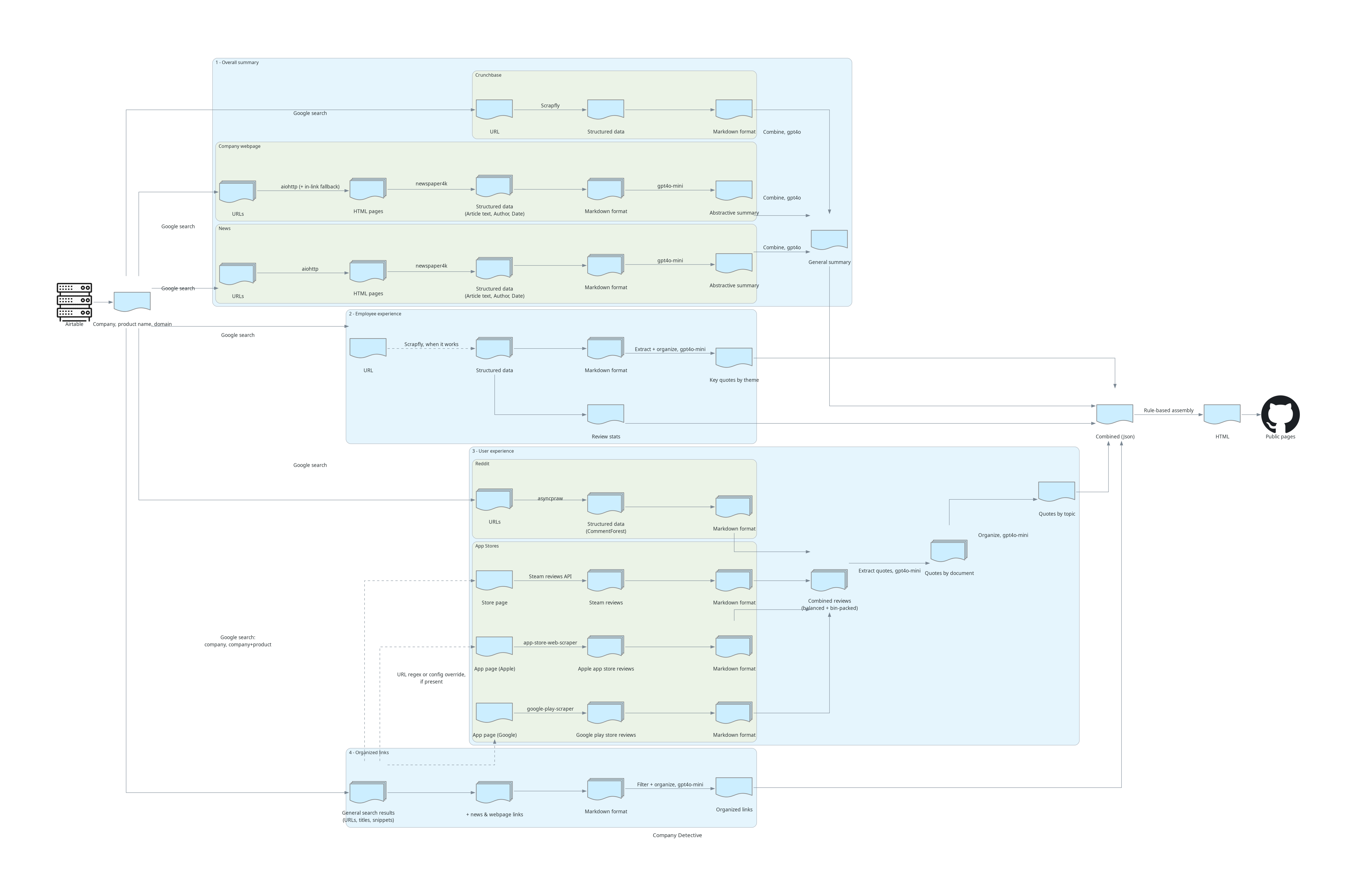
The full system diagram - dense on purpose. Click for full size; the numbered clusters match the four sections below.
Initially, I relied on one big abstractive summary for the whole report - the unified pipeline you’d sketch on a whiteboard. In theory that has the best upper bound of what’s possible; in practice it dropped information and didn’t focus evenly across the facets. The fix was sectioning the report, and each section ended up with its own pipeline: more moving parts, but each part became simpler, cheaper, and far easier to debug. The shipped report had four sections:
- An overall summary of the company, built from news, the company webpage, and Crunchbase
- Employee experience, from Glassdoor
- User experience, from app store reviews, Steam, and Reddit
- An organized collection of links, rendered at the end
At some point I was inspired by both research and engineering pointing to combine the strengths of extractive and abstractive summarization. Extractive summarization finds the key points of the input to copy-paste. Abstractive summarization generates a coherent summary.
Each section evolved in its own direction, and the pattern I notice is that each section drifted toward the cheapest and simplest mechanism that worked.
The overall summary: Two abstractive stages, one regret
The top of the report tells the general story of the company, built from the news, the company webpage, and Crunchbase when available. I experimented with other sources feeding it and felt that mix was best.
It shipped as two stages: The first stage optionally compacted all of the context with a small model, and the second stage synthesized the story with a larger model. In the first stage, the company webpage was summarized on its own and news was processed that way too (albeit with a more refined prompt). I also included relevant stats from Crunchbase, which didn’t need any summarization. Looking over the code, I believe I started from news alone but found that it wasn’t enough for some companies and begrudgingly included the company webpage (but clearly I didn’t tune the prompt for the company webpage that much). Looking back at it, if I could’ve done a flatter pipeline or relied more on extraction for the first stage, that would’ve been easier to debug and manage. My best guess for why I did things that way is that it was easy to implement and helped balance the different sources.
The webpage pipeline had two quirks worth mentioning. If the search on the company’s domain came back thin, it would crawl a few in-links to fill out the picture. And its summarization prompt was light while the news prompt carried a heavy debiasing persona that spelled out how to treat company claims skeptically. In hindsight that’s half-missing: the company webpage is the most self-promotional source in the whole system, and the debiasing belonged in its prompt too.
This section is also where I paid the debugging tax. Chaining a sequence of abstractive stages drastically increases debugging and tuning cost: when the output missed something or over-compressed, it took real work to figure out which prompt to edit. It takes a lot more work to localize prompt issues if you’ve got a tree of LLM calls with prompts that overlap in tasks. So as much as possible I’d recommend limiting the complexity of the LLM graph, and designing it so that you can look at an issue and know purely from the output which stage is likely at fault.
If I were rebuilding this section today, I’d flatten it. I’d make the webpage pipeline extractive - keep only the trustworthy facts and drop the promotional junk - then write the overall summary in a single prompt over those facts plus the news articles. I’d also put more effort into getting diverse perspectives into the news, and the simplest lever is diversifying the domains, in case some outlets skew consistently positive or negative.
Employee experience: extract-then-organize in a single prompt
The employee experience section was Glassdoor only: a few statistics from the numeric reviews, then a summary of the reviews generated by a single prompt.
That one prompt used the pattern I ended up trusting most in this project: extract-then-organize. Pull quotes out of the reviews, arrange them into themes, and stop there. I’d started from the literature’s extract-then-abstract, but the abstractive step was a letdown: it didn’t add much over well-organized quotes, it dropped information, it made citations less reliable, and it was harder to debug. So the abstract step became an organize step. The only real synthesis in that is identifying common themes and writing the headers.
Extraction asks very little intelligence of the model, and that’s its charm. Every quote is verifiable by a person - you took this sentence from this review - you don’t lose connotation or subtlety, and it’s rapid to iterate on. The classic downside is duplication: ten reviews saying the same thing can produce ten near-identical quotes. Organizing handles that without any rewriting: grouped under a theme, the repetition itself becomes signal that a lot of people feel the same way.
For Glassdoor’s volume, all of that fit in one prompt. The user experience section is what happened when it didn’t.
User experience: extract-then-organize at scale
The user experience section pulled reviews from the app stores, Steam, and Reddit. I followed the same extract-then-organize pattern, but the volume forced two more layers: balancing the sources against each other, and packing the model calls.
For App Store reviews, one challenge is that you might just have more users on iOS than Google Play, or vice versa. Another was that the libraries returned different maximums, based on how the underlying sites’ APIs work - roughly 500 reviews from the Apple side but only about 100 from Google Play - so I couldn’t get the same number of reviews for both. If I did nothing, whichever library returned the most would take over the extractive summaries. There tended to be systematic differences between iOS and Google Play reviews, so that imbalance would bias the overall summary.
So to keep the summaries fairly debiased, I randomly downsample the side that had too many. In practice that meant downsampling Apple reviews to 100. I’d meant to do date-distributed subsampling but never got around to it. In practice, when you take a hundred from a thousand at random, the dates come out reasonably spread anyway. Beyond the count caps, the balancing was prompt-driven: the extraction prompt instructs “extract a comprehensive sample of both positive and negative opinions,” and that one line was the rest of the debiasing mechanism.
For the summarization itself I was using LangChain’s MapReduce pipeline: when there’s too much data for a single prompt, chop it up, send the chunks to mapper calls, and combine the results in reducers.
The extractive mapper prompt is structured as filter-then-extract: first identify which reviews contain useful information, then extract quotes from those. Both steps had few-shot examples drawn from real companies I’d tested on, and the extraction examples demonstrate partial quoting - pulling the detailed middle out of a review instead of copying the whole thing:
Input: A lovely game reminds me of the Disney game, with lovely graphics, and music.
Output: ... lovely graphics, and music
The naive approach would be calling the model once per review, but that means hundreds or thousands of calls, and two things go wrong. The first is latency: you hit the provider’s concurrency limits, and a thousand short calls serialize into something really slow. The second is overhead: the shared instructions at the front of every call get paid for a thousand times.
So I did something inspired by the old Hadoop MapReduce days: group the reviews into batches that take about the same amount of time to process. So instead of a thousand mappers I might run ten. Unlike traditional MapReduce where the items usually take an equal amount of time to process, the texts here are all different lengths, so grouping them evenly is a small bin-packing problem: I formed bins with roughly similar amounts of text rather than similar numbers of reviews. It minimized overall latency, kept me under the concurrency limits, and amortized the instruction overhead.
One caution: don’t over-pack. In my experience, long prompts that approach the max context length tended to lose quality - I didn’t have time to evaluate that formally, so I played it safe and packed to 40,000 characters, which was good enough and didn’t add dependencies. If you do this at scale, I’d recommend spending a little time finding a fast-and-decent bin-packing algorithm and using tiktoken for sizing, then spending a little time optimizing the packing size.
The links section: organize only
The last section of the report was an organized collection of links: the union of the general search results plus the pages surfaced by the news and webpage pipelines. An extensive prompt filtered out the junk and grouped what remained - official social media, job boards, product reviews, news grouped by event, key employees. No summarization at all. This is the far end of the mechanical prompt spectrum, and it also serves the trust goal: the links section gives readers a way to keep digging past whatever my summaries chose to say.
Picking the models: Capability only where it’s needed
Splitting the report this way makes model selection almost automatic: extraction and organization ask so little of a model that a small, cheap one handles them, and the one stage that genuinely needed a capable writer was the overall summary’s combine. At the time that meant gpt-4o-mini everywhere except gpt-4o at the combine.
I should caveat that this was 2024, before reasoning models. Today I’d use the smallest model tier for extraction, a mid-tier model for organizing, and a frontier model for the final combine: spend model capability only where the task demands it. For example, the review sections users actually read came straight from the small model, and that was fine, because organized quotes don’t need a great writer.
Time-to-debug is a bottleneck
Early on, there was a company I ran through where we only found maybe a single Reddit post. The mapper stage output almost nothing, but the reducer was still designed to run, so it just hallucinated a product-reviews section. And everything else looked good so it was easy to miss.
Four cheap checks
You don’t need complex machinery to catch that kind of problem. I ended up with four cheap checks, all of them rule-based, interpretable, and fast enough to run on every stage of every run:
1. Compression ratio per stage. If we feed a thousand tokens of review text into an extractive stage and get zero out, that’s a clear problem; if we get a hundred thousand out, that’s another clear problem. So I logged the ratio of output to input chars across stages, and set a hard threshold on the one stage that caused me trouble: If the reducer in the review pipeline inflated the intermediate result by more than 50%, I logged an additional warning and discarded the entire reducer output as untrustworthy. The threshold is just a rule of thumb, not a tuned value, and it’s just enough to catch issues early without building a ton of test code.
2. Output length. Summary length is a common confounder in summarization evaluation: Depending on the specific type of summary, users may favor longer or shorter summaries and subtle changes in prompts can affect the length unexpectedly. So keeping an eye on compression ratio and overall length was useful as a hint about any quality changes I observed.
3. N-gram overlap with the input. An extractive stage should be mostly copy-pasted from its input, but you can’t check that with exact string matching because the model slightly changes typos, capitalization, punctuation, spacing, and so on. So I measured 4-gram overlap: split both texts into words, collect each side’s distinct word 4-grams, and take the fraction of the output’s 4-grams that also appear in the input. I used a crude tokenizer for this for iteration speed, and that’s enough to cleanly separate copy-pasting from rewriting. For a stage that’s designed to be extractive, that fraction should be high. I logged noisy warnings if less than 40% of output 4-grams came from the source for extractive stages, and also logged a warning for abstractive stages if it’s under 5%. Because I had some problems with the review pipeline, I also set a hard rule for it: If the output had under 5% overlap, I dropped it entirely.
4. Citations. The URL shortener made it easier to check for hallucinated URLs: There should be zero “cache://” links in the output after the code un-shortens the output. All exceptions are hallucinations. That check caught its first hallucinated ID (cache://reddit/10, not present in the source) within minutes of being implemented. Another easy check is the percentage of markdown links in the output that appear in the input. Ideally that should be 100%, but in practice there will be some bare domains in text in the input and the LLM may helpfully convert those to markdown links, introducing some new ones. So that’s got to be a warning rather than a hard assertion. A third simple check is the expected percent of output that’s used by citation URLs - I flagged anything with under 5% of the text used by those URLs, and that caught a few bad runs.
As a final safeguard, at the very end of the pipeline when converting to HTML, if there were any cache links left, I dropped the link.
In practice I designed the build process to be quick on the command line so I could just watch the logs: every stage printed its metrics decorated with ✅ or ❌, which was easily visible in a wall of black and white text. Most of the checks are observational - the only hard gates protected the review pipeline after being burned a couple times.
The takeaway is that quick-to-run quality indicators saved a few minutes here and a few minutes there, every single run, and caught problems long before I’d have found them by reading output. That’s what made them worth it in a situation where formal evaluation and unit testing were both significantly more costly.
Infra, briefly
A few infrastructure things, each with a 2026 note.
Airtable as the content management system. I wish I’d done this from the get-go. A form on the web page fed a Companies table, the pipeline pulled it into Python, and the approval workflow was literally a one-line formula - only rows with Status = “Approved” ran. I could approve, edit, and fix company configs right in Airtable’s UI, and other people could submit companies without talking to me. In 2026 I’d probably still use it - keep in mind Airtable was just acquired in August 2026, and acquisitions tend to destroy free tiers.
A static site on GitHub Pages. I could build the long-form reports, review them locally, and share them with a link. It enabled me to iterate quickly and get feedback easily, so it was a great call - though not free of drawbacks. In user interviews I learned that people needed the report right at the moment they’re preparing for an interview, and a batch system makes them wait. I still think it was the right call at that stage; if the interviews had been more positive, the next step was making it a live system. In 2026, GitHub Pages is still where I’d start: super easy, super cheap, and it unlocks feedback.
Permalinks and the report UI. For Glassdoor reviews and Reddit comments I took care to carry permalinks all the way through the system, so a reader lands exactly on the review or comment - sometimes via text-fragment links that scroll to the quoted text when there’s no anchor. That bought two things: debugging speed, because I could click from any claim straight to its evidence while iterating, and user trust, for the same click. iOS reviews were the exception - no permalink system on the web - so I intercepted those clicks on the front end and rendered a popup with the review instead. The synthetic review URLs use deliberately fake domains, so a missed interception can’t navigate anywhere real, and any cache:// links that leak into prose get stripped to plain text.
Python tooling. Pydantic I’m still a big fan of, and it aged well - by 2026 both major providers accept your Pydantic model directly for structured output. LangSmith was nice at the time, but mostly because it was hooked into the LangChain ecosystem; today I’d want traces saved locally in a debuggable form, and I’d probably spend a day with Claude Code adapting an existing tool. And LangChain itself - I’m not even a hundred percent sure it was worth it at the time. The documentation was hit or miss, but the MapReduce chains were a genuinely useful idea, if only the idea itself. Since then I haven’t used it at all: for each project I call the OpenAI or Claude library directly and roll my own caching on top.
Costs, briefly. From memory, the monthly bills ran something like $30 for Scrapfly, $5 for Google search, and $1 for OpenAI. It struck me as funny that with all the hype around LLM intelligence, it was the cheapest part of the pipeline.
What I never solved
There were also many problems I never really solved. In some cases I experimented briefly but didn’t find a quick option. They’re worth walking through briefly, with a note on whether each looks easier in 2026. Most end with a few starting points for the motivated reader; a ✅ marks work peer-reviewed at an established venue so you know it’s survived criticism, and unmarked entries are preprints.
Time-oriented summarization
Ideally the overall summary for 98point6 would tell the story of change over the years: the early days had a lot of energy through the struggle for product-market fit. As we grew revenue, we also needed to grow the organization which led to the classic scaling challenge: we were good at running a fifty-person organization, but not yet skilled at running a two-hundred-person one. And the later years were the COVID era: the telehealth surge, the easy-money environment, and then the hard landing after it.
It would be great to take all the news and web data and reviews across the years and tell that story. I never quite figured it out. The smallest version of change-over-time was to prompt the model “How has the company changed over time?” but that didn’t do much. I also ran statistical tests to see if review scores were changing over time, but that didn’t connect to the LLM.
I wanted to go further but hit a tough challenge: not all companies have even that story! So detecting whether there’s a story of change is a part of the challenge.
Some starting points for the motivated reader:
- Piryani et al., 2026. It’s High Time: A Survey of Temporal Question Answering. ACL. ✅ - A survey of temporal reasoning over text in the context of question-answering (detection, ordering, reasoning over change); a good landscape overview.
- Zhang et al., 2026. TimelineReasoner: Advancing Timeline Summarization with Large Reasoning Models. SIGIR. ✅ - Timeline construction from unstructured documents with reasoning models. It doesn’t have any citations yet, so the next paper might be a better starting point.
- Sojitra et al., 2024. Timeline Summarization in the Era of LLMs. SIGIR. ✅ - Benchmarks LLMs against the pre-LLM state of the art on timeline summarization across three strategies (chunking, knowledge graphs, reranking); an established starting point for the task.
- Lukassen et al., 2026. LLM-Augmented Changepoint Detection: A Framework for Ensemble Detection and Automated Explanation. arXiv preprint. - An ensemble of changepoint detectors finds the break, then an LLM explains it with context. The references largely point to statistical changepoint methods so the LLM x changepoint combination may be rare.
- Nie et al., 2026. EvoTrustRAG: Evolution-Aware Conflict Attribution and Evidence Handling for Reliable Retrieval-Augmented Generation. arXiv preprint. - Builds on the subfield around resolving conflicting evidence by considering the time of information. It’s not vetted yet, but the citation graph is rich with work on handling conflicting evidence.
Picking the aspects
Another one: picking the aspects in the aspect-oriented summarization. I picked product, employee experience, finances, and general, which was good for tech startups but not all companies. The aspects should probably be industry-specific, or even sub-industry-specific.
My plan was to have a frontier model draft the aspects for an unfamiliar industry as a stopgap until I could get experts to curate them. Perhaps it’d be a human-in-the-loop process to reduce curation effort. I never explored it, because it turned out new industries also meant new custom data-source work, which was the real bottleneck.
While writing this post I tried to find literature on the specific problem - which aspects matter for which industry - but I wasn’t able to find any. There are adjacent starting points:
- Yang et al., 2023. OASum: Large-Scale Open Domain Aspect-based Summarization. ACL Findings. ✅ - 3.7M aspect-summary pairs across open domains; useful for seeing how diverse aspects generalize. Code and data: OASum.
- Amar et al., 2023. OpenAsp: A Benchmark for Multi-document Open Aspect-based Summarization. EMNLP. ✅ - A benchmark where the aspects aren’t fixed in advance but specific to each document set; the closest evaluation setting to industry-specific aspects. Code: OpenAsp (the underlying DUC data requires a NIST access request).
- Shen et al., 2025. Zero-Shot Cross-Domain Aspect-Based Sentiment Analysis via Domain-Contextualized Chain-of-Thought Reasoning. EMNLP Findings. ✅ - Transferring aspect understanding to a new domain without target-domain data.
- Tian et al., 2025. CARPAS: Towards Content-Aware Refinement of Provided Aspects for Summarization in Large Language Models. arXiv preprint. - Predicts which aspects are actually relevant from the documents before summarizing; the closest thing to the LLM-drafts-the-aspects stopgap.
- Dhole & Agichtein, 2026. RubricRAG: Towards Interpretable and Reliable LLM Evaluation via Domain Knowledge Retrieval for Rubric Generation. arXiv preprint. - Retrieves domain knowledge to ground LLM-generated rubrics; the same general idea as grounding industry-specific aspects.
Which HTTP codes are transient, per site
A super basic one: which HTTP error codes should we retry? In theory it’s standardized: a 404 isn’t retryable, a 429 is. In practice, sites aren’t as standardized and many just use a generic 400 or 500 rather than the more specific codes. This came up again at Layr. I think a data-driven solution is possible: which codes actually behave as transient, per site, measured, but as far as I can tell nobody has made one.
Is structured extraction even worth it?
Another one I never settled during Company Detective: for a structured page like Crunchbase, is it better to process HTML with a LLM? Process a markdown version with a LLM? Design a custom HTML/CSS/JS extractor?
By Layr I’d developed a stance: start with LLM-based structured extraction, and if a source becomes critical path or high cost, build the HTML/CSS extractor. That way you iterate quickly with LLM extraction early, when iteration speed is the thing that matters most, and you pay the maintenance cost sparingly.
Search reranking and agentic fallback
Sometimes even tuning the searches wasn’t enough. I wish I’d had two options for those cases:
- Quick, reliable reranking for the cases with some good results
- Agentic search for the cases that needed query reformulation
I tried LLM-based reranking for Reddit search and it had promise as a quality improvement, but it added a slow LLM step and prompt tuning was finicky. The classic fast option is a small cross-encoder reranker (the sentence-transformers guide is a practical starting point). I passed on those because my information needs were long and elaborate rather than keyword-shaped. That instinct turns out to be half-right: it’s not the length that hurts, but rerankers trained on short web questions tend to flatten an elaborate information need into keywords. Either way, reranking is something that might be worth revisiting in 2026+ with better, faster models.
Some starting points for the motivated reader:
- Nogueira et al., 2020. Document Ranking with a Pretrained Sequence-to-Sequence Model. Findings of EMNLP. ✅ - The monoT5 recipe: a small, fast model scoring query-document pairs, and the standard pre-LLM reranker to try first.
- Sun et al., 2023. Is ChatGPT Good at Search? Investigating Large Language Models as Re-Ranking Agents. EMNLP. ✅ - Shows LLMs working as reranking agents; the natural starting point for the reranking idea.
- Wang et al., 2023. Query2doc: Query Expansion with Large Language Models. EMNLP. ✅ - LLM-generated pseudo-documents as query expansion; a foundational technique for when the initial query underperforms.
- Weller et al., 2025. FollowIR: Evaluating and Teaching Information Retrieval Models to Follow Instructions. NAACL. ✅ - Tests retrieval models on full, elaborated information needs rather than keywords; classic cross-encoder rerankers get worse, treating the instructions as keywords.
- Ning et al., 2026. Agentic Search in the Wild: Intents and Trajectory Dynamics from 14M+ Real Search Requests. SIGIR. ✅ - Large-scale empirical look at how search agents actually reformulate queries across multi-step sessions.
- rerankers - a unified API across cross-encoders, monoT5, and LLM-listwise rerankers, so you can swap any of the approaches above into a pipeline without rewriting the interface.
Maximizing the margin of the correct citation
The citation work earlier in the post was circling an idea I never got to: treat the citation as a next-token problem, and maximize the probability margin between the correct citation and incorrect citations. The model generates the citation as a continuation of the quote, so every detail of how citations appear in the input slightly shifts how likely the correct one is in the output.
The directions I had in mind:
- Consistent ordering between input and output. This was my regret from the citations section: in the source documents the citation came before the body text, but in the output it came after the quote. Keeping the order consistent might improve the margin on the correct citation.
- Optimizing the citation decoration. The markdown and parens around each citation cost tokens on every single citation. URIs seemed like a good fit for web sources, though I suspect there’s room to both reduce tokens spent on decoration and make them distinct from everything else in the input and output.
- Semantic IDs. The numbers in my
cache://scheme seemed like a weak point because they’re not inherently related to the text of the post, only related via the supplied context. If I’d had more time, I would’ve liked to experiment with word-based IDs that are more closely related to the source text. If nothing more, that might’ve made debugging easier: My eyes just gloss over when I’m comparing citation 121 and 124.
I only ever got as far as noticing the ordering issue, so consider this as a sketch of experiments I didn’t find the time for.
Eval for deep research
Evaluation was a challenge. I described that in the previous post so I won’t rehash it too much here. I was only capable of making a good reference output for 98point6. I had insider perspective from Singularity 6, but not enough to even write a full reference output. It was time-consuming so I couldn’t really ask others to write those for their current and former employers.
In 2026, I’d do a few different things around evaluation:
- Do a full literature review on the benchmark ecosystem for deep research, which has developed since 2024.
- Find reference points for citation hallucination to compare against.
- Use the most advanced models of 2026 to generate reference output for individual stages, whether extractive or abstractive stages, and refine those reference outputs myself. Then evaluate with one of the many reference-similarity metrics. I wouldn’t focus on an overall reference output, just the per-stage evaluation.
Some starting points for the motivated reader:
- Xu & Peng, 2025. A Comprehensive Survey of Deep Research: Systems, Methodologies, and Applications. arXiv preprint. - A survey of deep-research systems and how they’re evaluated; the place to start a lit review.
- Abaskohi et al., 2025. DRBench: A Realistic Benchmark for Enterprise Deep Research. ICLR 2026. ✅ - Benchmark for enterprise report generation with insight-recall and report-quality evaluation; the closest shape to a company-report pipeline. Code: drbench.
- Du et al., 2025. DeepResearch Bench: A Comprehensive Benchmark for Deep Research Agents. ICLR 2026. ✅ - 100 research tasks with paired report-quality and citation-accuracy evaluation methodology. Code: deep_research_bench.
- Rao et al., 2026. Detecting and Correcting Reference Hallucinations in Commercial LLMs and Deep Research Agents. arXiv preprint. - Measured citation-hallucination rates (3-13%) in deployed systems; a reference point for citation checks.